


|
|
ADSelfService Plus assists administrators in improving Windows logon security by supporting two-factor authentication. Once this feature is enabled, users will be required to authenticate using any one of the logon TFA methods of ADSelfService Plus in addition to entering their Active Directory domain credentials during Windows logon.
Prerequisites:
SSL must be enabled: Log in to ADSelfService Plus web-console with admin credentials. Navigate to Configuration → Administrative Tools → GINA/Mac (Ctrl+Alt+Del) → Windows TFA Logon. Click the Enable SSL (https) link. Select the Enable SSL Port checkbox and click Save. Restart ADSelfService Plus.
TFA must be enabled: Back in the Windows TFA Logon screen, click Enable TFA. In Logon TFA settings, select the Enable Two-Factor Authentication checkbox and configure any one of the authentication methods provided. Click OK.
GINA/CP Client Software must be installed on client machines. Make sure that the client software is installed through GINA/Mac Installation console (Configuration → Administrative Tools → GINA/Mac (Ctrl + Alt + Del) → GINA/Mac Installation) available in ADSelfService Plus. Windows Logon TFA will not be supported on machines with client software installed manually, through GPO, or using any other method.
Steps to be followed to enable two-factor authentication during Windows logons:
Log in to ADSelfService Plus web-console with admin credentials.
Navigate to Configuration → Administrative Tools → GINA/ Mac (Ctrl + Alt + Del) → Windows Logon TFA.
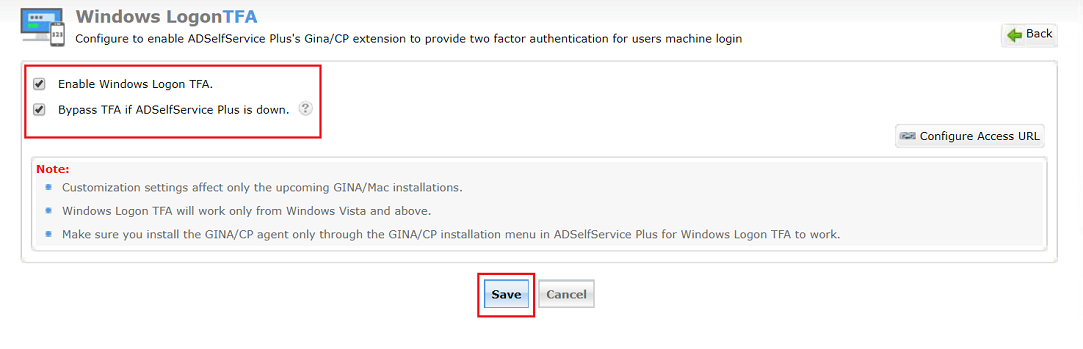
Select the Enable Windows Logon TFA checkbox.
By default, the Bypass TFA if ADSelfService Plus is down checkbox is selected when you enable Windows Logon TFA. If this option is left unchecked, users would not be able to access their machine when ADSelfService Plus is not accessible.
Make sure that the access URL has HTTPS as its selected Protocol by checking the settings of Configure Access URL.
Click Save.
|
|
Any alterations made in the Windows Logon TFA feature should be followed by scheduling the GINA/Mac Installation scheduler or the GINA/Mac Customization scheduler. |
|
|
